
A virtual patch shields a flaw by refusing the requests that exploit it, until the flaw is fixed at its source. Updating the software is always the real fix; a virtual patch protects the server in the meantime.
Virtual Patches in the menu has two tabs: the patches PortWall provides, and the ones you write yourself.
PortWall patches
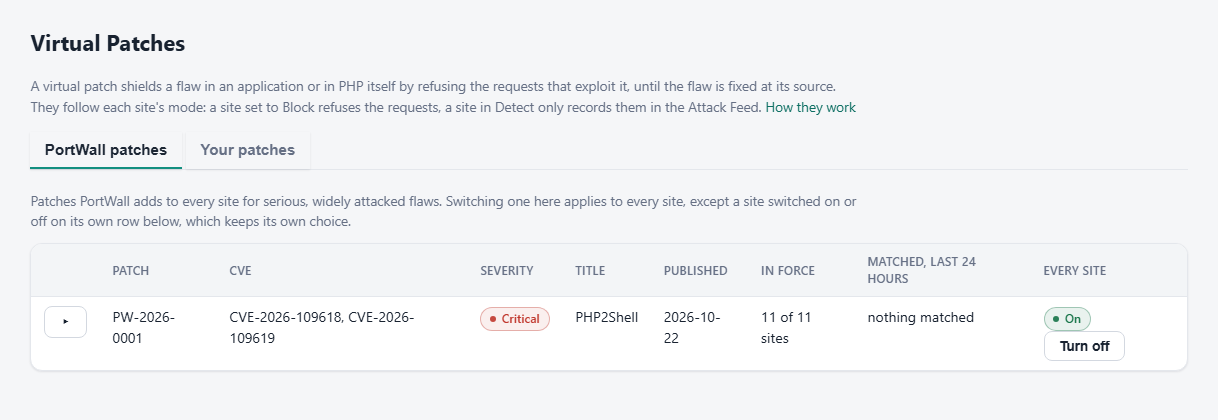
When a serious, widely attacked flaw is disclosed in software that sites commonly run, PortWall adds a patch for it to every site by itself. You do not have to write anything. Each row shows:
- the patch id (for example PW-2026-0001), the CVE ids, how severe the flaw is, and when the patch was published;
- In force: on how many of your sites it is on;
- how many requests it matched in the last 24 hours;
- a switch that turns it on or off for every site.
Open a row to see what the patch refuses, the real fix (for example which PHP version to update to), the rules it uses, and every site with its own state and its own switch.
Modes and switches
A patch follows each site's mode like every other rule: a site set to Block refuses the requests, a site in Detect only records them in the Attack Feed. A new patch does the same from the moment it arrives; nothing waits in a trial period first.
- The switch on a row applies to every site, except a site switched on or off for itself. A site keeps its own choice, whatever is chosen for every site afterwards.
- To make a site follow the switch for every site again: for a site turned off on its row, remove its exclusion of the patch's rules on the site's page; for a site turned on on its row, tick the rules under Inherited from global defaults on the site's page while the patch is off for every site.
- Switching a patch off adds an exclusion of its rules, which you will also see in the site's or the box-wide exclusion list, marked "Built-in protection turned off". Removing that exclusion turns the patch back on.
Turn a patch off only for a site where it refuses something the site really needs. The Attack Feed shows what it refused and why.
How new patches arrive
New patches reach your server by themselves, usually within minutes of PortWall publishing them. You do not install an update and nothing restarts: your server checks each patch (they are signed, and a server only accepts one that checks out) and adds it to every site. When a new patch starts protecting your sites, PortWall records a notice - "New PortWall virtual patch PW-... for CVE-... is now protecting N sites" - under Operational Events, and sends it as an alert email unless you have switched that kind of alert off under Notifications.
The patches are refreshed every day and stay valid for 14 days without a refresh, so a short loss of connection changes nothing. They do need a valid licence and a connection to PortWall's licence service. Protection Status keeps watch, and says so when something is wrong:
- Not refreshed for more than 3 days - a warning. Check that this server can reach the licence service; the patches refresh by themselves once it can.
- "PortWall virtual patches expired - PortWall could not refresh them" - an error. The patches that arrived this way are no longer applied to your sites until they refresh (the PHP2Shell patch, which comes with PortWall itself, is not affected). Check the server's connection and that the licence is active.
- A patch could not be loaded - an error that names the patch, for example "PortWall virtual patch PW-2026-0003 could not be loaded and is not protecting your sites". PortWall applies every patch that loads and leaves out only the one that does not; the others keep protecting. PortWall is told of it automatically and replaces the patch, so there is nothing to do unless it stays for more than a day, in which case contact support and attach the output of
C:\portwall\control-plane\portwall-admin.exe diagnose.
The page and its switches cover these patches exactly as they cover the first one: a switch adds an exclusion of the patch's rules, and an expired set of patches is not listed because it is not applied.
How a patch ends
A patch is listed only while it is current. In a later release the same rules become part of the WAF rules themselves, under the same rule ids, and the patch leaves this page. The protection carries on without a break, and every on or off choice you made carries over, because those choices are exclusions of the same rule ids.
So this tab only ever holds current CVEs. Older ones are part of the WAF rules.
Your patches
The patches you write for a single site's exploit or CVE, across all sites in one list. Each has a rule, where it looks (such as ARGS:id), an operator and a pattern, and a stage:
- Detect records what it matches and blocks nothing, so you can check it on live traffic first;
- Block refuses matching requests with a 403.
Choose the site, fill in the rule and press Add; the site is republished at once. → Block and → Detect promote or demote a patch, and Delete removes it. An optional expiry (in minutes) ends a patch by itself; an expired patch is marked as expired and no longer in force.
A site's own page shows a short line with how many PortWall patches are in force on it and how many of your own it has, with a link here.
Now part of the WAF rules
None yet.