
Bot Protection (under Detection) holds PortWall's defences against automated traffic that WAF rules alone do not stop: scrapers, credential-stuffing tools and floods of ordinary-looking requests.
Plans
Bot protection is part of PortWall Premium and above on Windows, and of every appliance edition. On a plan without it the page says so, and what you set for it is saved and takes effect when the licence includes it. It covers the browser check for sites under attack, the check for visitors a detection flags, what a detection does to the addresses it found, and TLS fingerprinting. Without it, detections still appear in the Attack Feed and in alerts.
Two things work on every plan: the paths never checked, difficulty and pass time below (the checks that threat-intel feeds, geo-blocking and login protection use share them), and login protection's own step before a block - a browser that keeps failing to log in is shown the check on the login page - which is part of brute-force protection.
The browser check
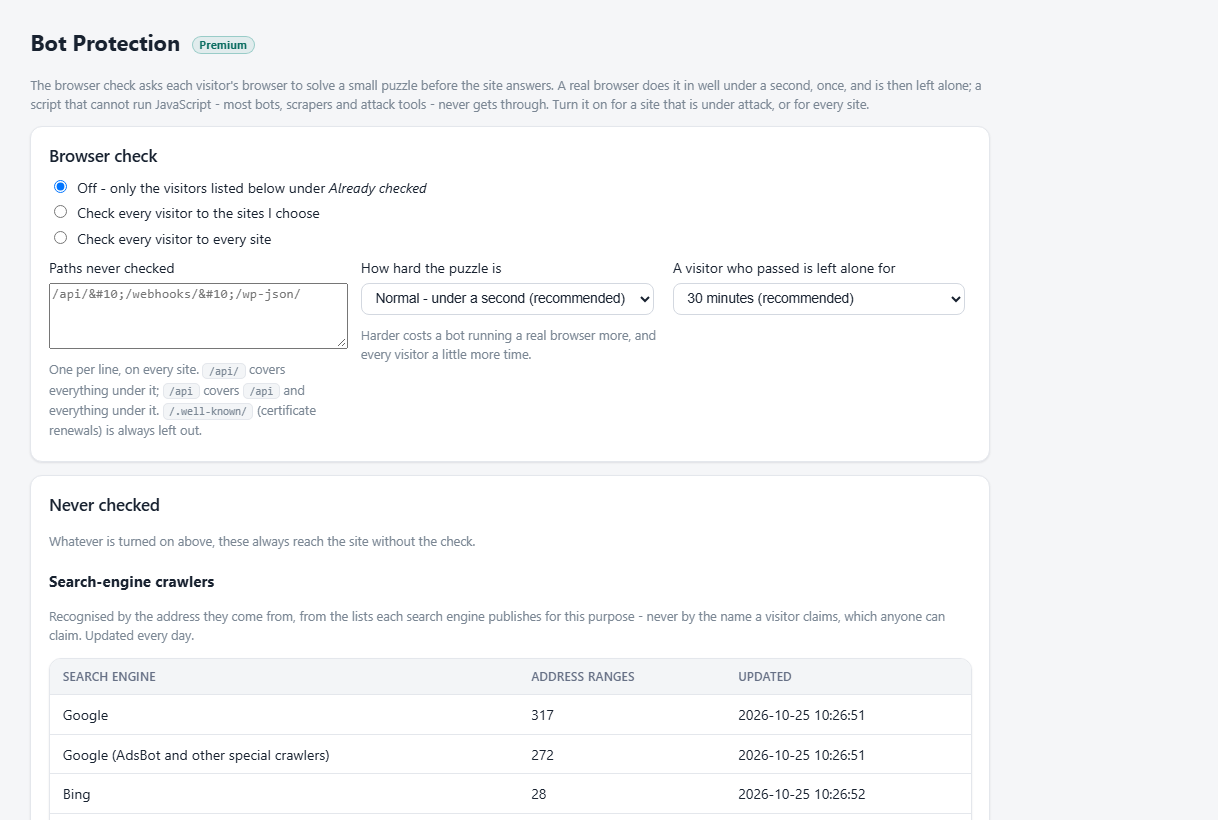
The browser check asks each visitor's browser to solve a small puzzle before the site answers. A real browser does it in well under a second, once, and is then left alone for the time you choose (30 minutes by default); a script that cannot run JavaScript - most bots, scrapers and attack tools - never gets through. Nothing is sent to anyone else: the puzzle and the check run on this server.
Choose who is checked:
- Off - only the visitors listed under Already checked below.
- Check every visitor to the sites I choose - for a site that is under attack.
- Check every visitor to every site.
The change reaches every site as soon as you save.
Paths never checked
API clients, webhooks and mobile apps cannot run the check's script, so on a checked site they would be refused. List their paths under Paths never checked, one per line - for example /api/, /webhooks/ or /wp-json/. A path ending in / covers everything under it; /api (no slash) covers /api itself and everything under it, but not /apiary. /.well-known/ is always left out, so certificate renewals keep working.
How hard, and for how long
How hard the puzzle is sets how much work a browser does. Normal takes well under a second on any device. Strong and Strongest cost a bot running a real browser more, and every visitor a little more time - they are for a heavy attack. A visitor who passed is left alone for sets how long a pass lasts. A pass belongs to the visitor's address, so a phone that moves to another network is asked once more.
Never checked
Whatever is turned on, these always reach the site without the check:
- Search-engine crawlers - Google, Bing, Apple and DuckDuckGo. They are recognised by the address they come from, from the lists each search engine publishes for this purpose, never by the name a visitor claims, which anyone can claim. PortWall downloads the lists every day; the page shows how many address ranges each has and when they were last updated. If a list cannot be downloaded, the one from before is kept.
- Your allowlist - every address on Allowlist with the WAF scope.
Already checked
Even with the browser check off, it is shown to addresses on a Threat-intel feed whose action is Challenge, and to countries a Geo-blocking policy sends to the check. Challenge is the gentle choice for a feed of shared addresses - a mobile carrier's, or a VPN's - where a block would also refuse real people.
TLS fingerprinting
The way a client opens an encrypted connection identifies the program behind it, whatever address it uses. With Record each visitor's TLS fingerprint on, PortWall's detections recognise one bot spread over many addresses as one bot. It is off by default and adds no noticeable cost.
Backups
Bot protection is part of every backup made on Backup & Restore, except the key that signs the check's passes: a restored server keeps its own.