
Geo-blocking refuses (or, in audit mode, just logs) inbound traffic from chosen countries, on chosen ports, at the kernel firewall. Use it to cut whole regions you never expect legitimate traffic from.
Turning it on
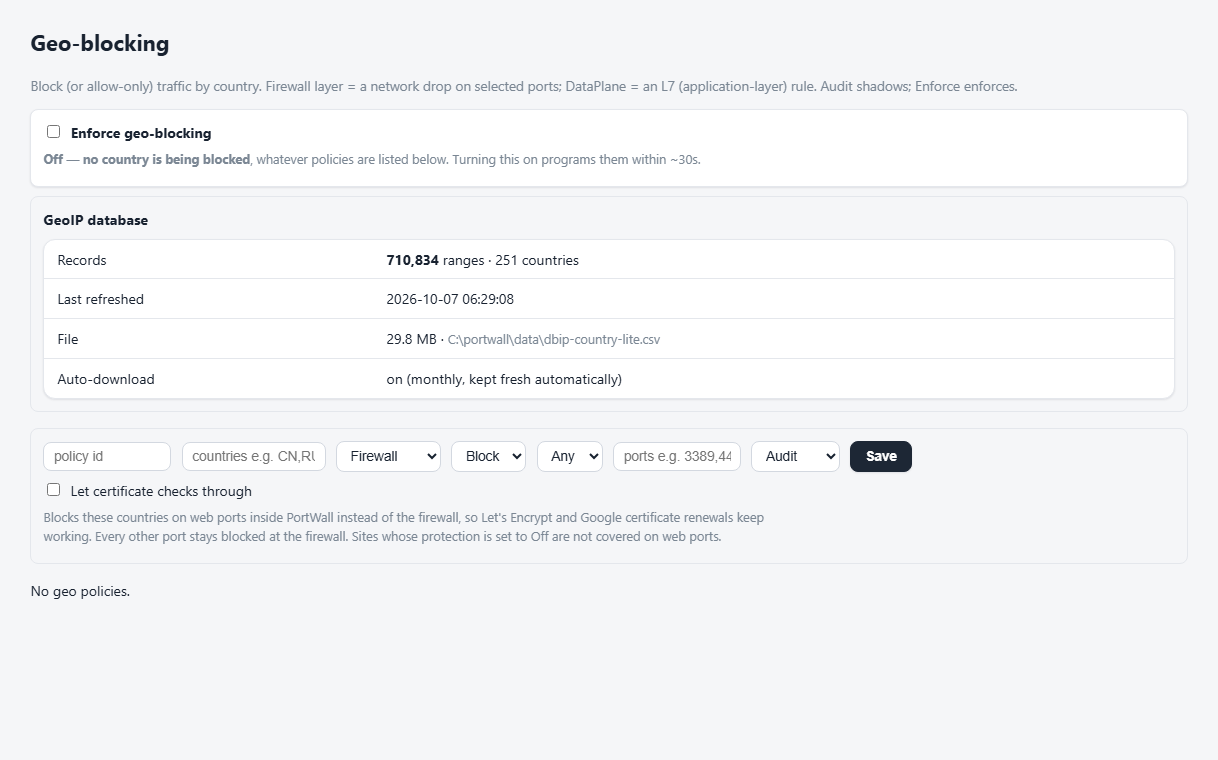
- Go to Geo-blocking.
- Turn the geo subsystem on (the master switch takes effect within ~30 seconds).
- Add a policy: pick the countries, the protocol/ports, and a mode.
Policy modes
- Enforce — the countries' address ranges are programmed as firewall drops.
- Audit / shadow — ranges are recorded but not blocked, so you can see the impact before committing. This is not a fault; the Overview card shows "audit" and stays green.
The worker resolves each country to its CIDR ranges from the GeoIP database (minus your allowlist) and programs the rules on its next reconcile.
Certificates and geo-blocking
Let's Encrypt and Google Trust Services check a certificate by connecting to your server on ports 80 and 443 from several countries. They do not announce which, and it changes. If a firewall policy blocks one of those countries, a PortWall-managed certificate can fail to be issued or renewed.
Tick Let certificate checks through on a firewall block policy to avoid that. The countries are then blocked on the web ports inside PortWall instead of at the firewall, and only a certificate check (a request for /.well-known/acme-challenge/…) gets through. Every other port stays blocked at the firewall. Things to know:
- It is off unless you turn it on, and it is set per policy.
- A blocked visitor can still open a connection to ports 80 and 443; every web request is answered with a block page (403).
- Those refusals are not attacks, so they are not listed in the Attack Feed. The Refused in the WAF table on the Geo Blocking page counts them per policy and country, for the last 24 hours and the last 7 days.
- Sites whose protection is set to Off are not covered on the web ports while the option is on.
- Every other kind of traffic from those countries (UDP, ping and the rest) stays blocked at the firewall, on Windows and on the appliance.
If a managed certificate fails while a firewall geo policy could be the reason, the TLS / SSL certificates page and C:\portwall\control-plane\portwall-admin.exe diagnose say so and name the policy.
Search engines and geo-blocking
Google and Bing crawl the web almost entirely from the United States, and other search engines from their own countries. If a policy blocks a country a search engine crawls from, it cannot read your sites, and they drop out of its search results.
Let search engines through, on the Geo Blocking page under the master switch, prevents that. It is on unless you turn it off, and it applies to every policy. Things to know:
- The crawlers of Google, Bing, Apple and DuckDuckGo are recognised by the address ranges those search engines publish for this purpose. PortWall downloads the lists daily, the same ones Bot Protection uses. A visitor that only calls itself Googlebot, from any other address, is blocked like everyone else.
- Those ranges are left out of every country you block, at the firewall and in the WAF, the way your allowlist is. A policy that allows only some countries lets the crawlers in too.
- When a search engine publishes new ranges, geo blocking follows within a day.
- Turn it off if you want the crawlers from a blocked country blocked too.
If your sites dropped out of search results while a country was blocked, check that the switch is on, then ask the search engine to crawl them again: in Google Search Console, use URL Inspection and Request indexing, and resubmit your sitemap; Bing Webmaster Tools has the same.
Verifying
The Overview geo card shows evidence when enforcing — e.g. "enforcing 55 geo blocking filters from 2 policies." If it is red — "ZERO geo blocking filters are in force" — the policy is set to enforce but nothing was programmed; check the worker log and re-save the policy.
For a policy applied in PortWall's WAF, or one that lets certificate checks through, the Refused in the WAF table on the Geo Blocking page shows how many web requests each policy refused from each country. Logged counts requests that were recorded but not refused: the policy is in Audit mode, or the site's protection only reports.
On a Windows server, geo blocking is enforced by Windows at the network layer (the Windows Filtering Platform), not as rules in the Windows Firewall console, so it is not listed there. It is applied all at once, in about a second, and stays in force across restarts. C:\portwall\control-plane\portwall-admin.exe diagnose checks sample addresses of every blocked country against what is in force; netsh wfp show filters lists the filters under the provider PortWall geo blocking. Uninstalling PortWall removes them.
Notes
- GeoIP data — the Geo page shows whether a database is present and how current it is. Accuracy depends on it.
- Ports — scope policies to the ports that matter (e.g. web ports) rather than everything, so you don't accidentally block management access.
- Allowlist wins — allowlisted addresses are never geo-blocked.